
Sidebar
preferences:preferences_categories:file_displays:status_bar:definitions
Status Bar Definitions
This page lets you edit the various definitions that control the information shown on the status bar.
The Definitions drop-down at the top lets you select the definition to edit. See the main Status Bar page for a description of the four definition types and when they're used.
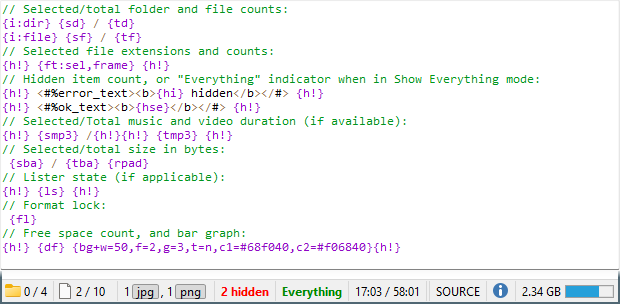
This image shows the default status bar definition. Not counting the comments that begin with //, there are ten lines in the text field, which means ten separate sections in the status bar. As you can probably tell, you tell Opus which information to display using a series of {..} codes, which are described in detail in the reference section. The Codes drop-down above the text field also provides a full list with descriptions of their meanings.
Below the text field is a small preview of the status bar - this updates in real time, so as you make changes to the status bar definition you can get an idea for how it will look in real life. A red highlight indicates the section you're currently editing.
The first line of text in the status bar definition shown above corresponds to the first section in the preview, and so on.
See the Status Bar Codes reference section for the full list of codes you can use.